Jan - March 2026
Phishing Scams – What to Watch For
Phishing scams may be sent by email, text message, phone call, or social media, and often pretend to be from trusted organisations. eg: PayPal, AusPost, ATO, MyGOV.
What Scammers Want You to Do
If you click the link, they may ask for:
-
Usernames and passwords
-
Card or bank details
-
Onetime passwords (OTPs)
If you call the number, they may:
-
Pretend to fix an issue or dispute transactions for you
-
Ask for security codes
-
Try to access your device
-
Guide you into making payments
See the examples below of common phishing scams:
-
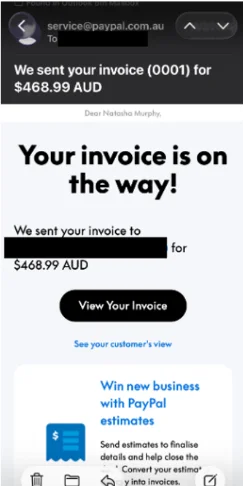
Fake invoice: A message claiming an invoice has been issued (often using names like Bitcoin) and asking you to click a link or call a number.
-
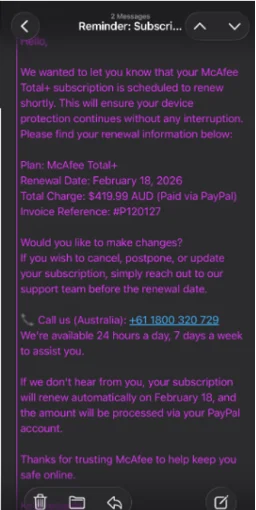
Fake subscription renewal: A message saying a subscription has been renewed or will be charged, urging you to call to dispute it.
-
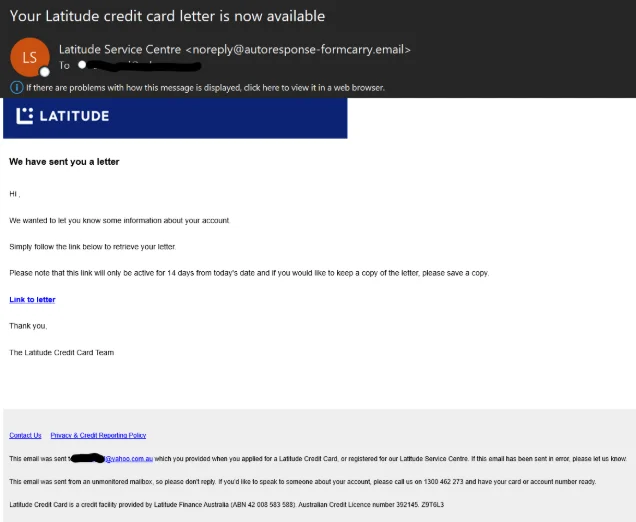
Fake credit card letter: An email claiming to a letter for your credit card asking you to click a link to retrieve it.
How to Protect Yourself
-
Avoid clicking links in unexpected messages
-
Check and contact via phone numbers against the organisation’s official website
-
Only enter personal details on official websites or apps
-
Never share OTPs, passwords or security codes
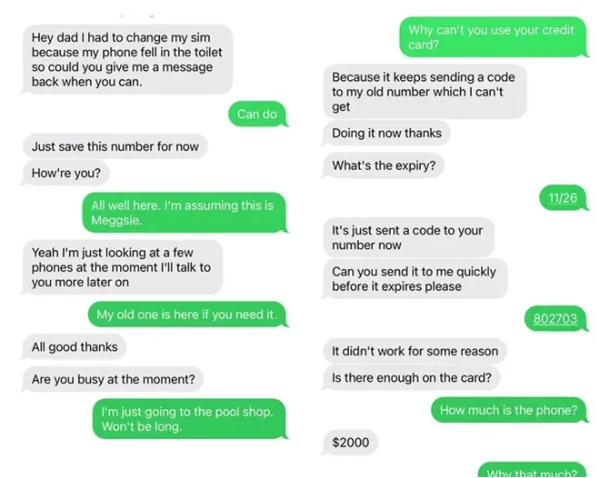
Hey Mum / Hey Dad” Scam – What You Need to Know
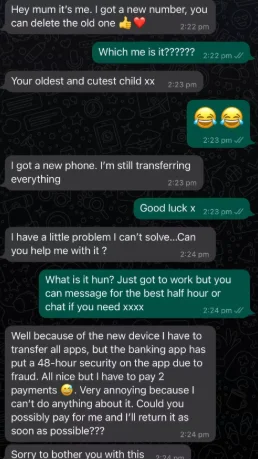
Phishing scams can also involve scammers pretending to be your child or another close family member. They usually claim:
-
They’ve lost their phone
-
They’ve broken their phone
-
They’re using a “temporary number”
-
They need urgent help paying a bill, rent, or replacing the phone
-
They cannot access their bank account
See two examples below of a ‘Hey Mum/Dad’ scam.
How to Protect Yourself
-
Stop and check – contact your child/family member on their usual number
-
Don’t transfer money to anyone claiming to be a family member without verifying their identity
-
Never share OTPs, passwords or security codes
-
Avoid clicking linksin unexpected emails or messages
-
Only enter personal details through official websites or apps
If something feels urgent or unusual, that’s a red flag.