
How it works
Your card details are available in the App, so you can shop online, manage subscriptions, make purchases anytime without your physical card, and add your card to your digital wallet for in-store purchases.
Lost your card? No need to wait for a replacement, your card details are ready when you are.
Let your budget breathe
Enjoy a 13.99% p.a. purchase rate, so you can stretch your budget without stressing it.
Earn on everyday spend
Get 3% back in Latitude Rewards1 when you set up recurring payments direct with participating utilities, telco, and streaming services. T&Cs apply.
Team up for even more rewards
Add an additional cardholder at no extra cost and become the ultimate rewards-earning team. Learn More.
Travel with peace of mind
Wherever you go, our specialist team keeps your personal info safe from fraud and identity theft. Learn More.
Access your card details in seconds
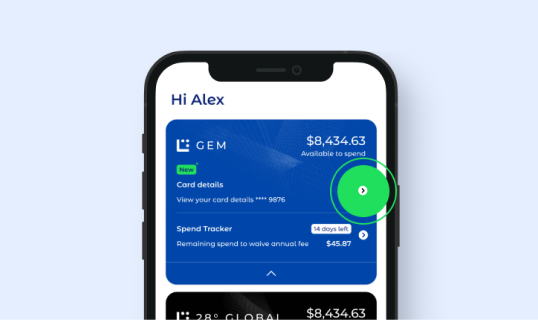
Step 1
Log in to the Latitude App, select the card you wish to use and tap the arrow next to ‘Card details’.
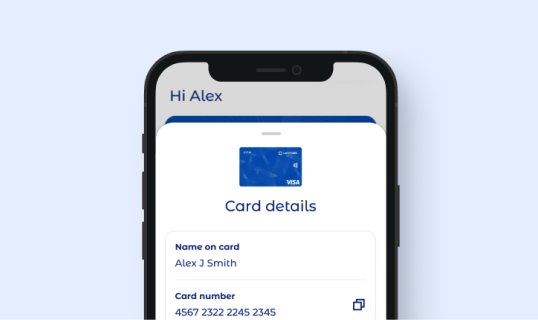
Step 2
Your card details (card number, expiry date and CVV) will pop on up the screen.
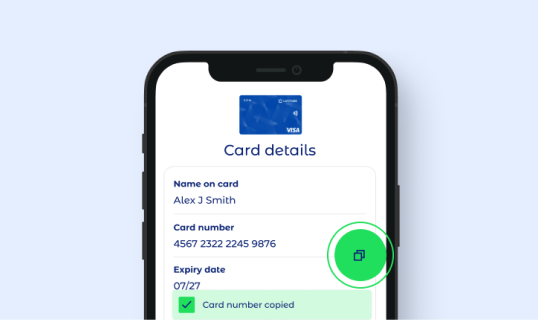
Step 3
Simply tap the ‘Copy’ icon to copy your card number when shopping online.
Download the Latitude credit card app
Manage your account, make payments and track your purchases in just a few taps with our mobile app.

